Cancel an Invoice
In MASC you can cancel an invoice before it has been posted to Sage , Intact or your accounting system.
We have recorded the screen actions for this operation
Please click here to view the demo

In MASC you can cancel an invoice before it has been posted to Sage , Intact or your accounting system.
We have recorded the screen actions for this operation
Please click here to view the demo
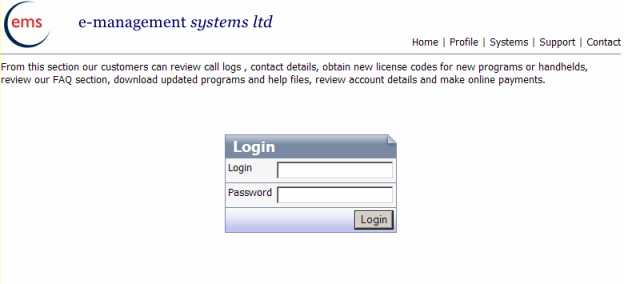
When you have pressed Login the following screen will be displayed
You should enter your Company Name and Serial number which are displayed on you masc registration screen
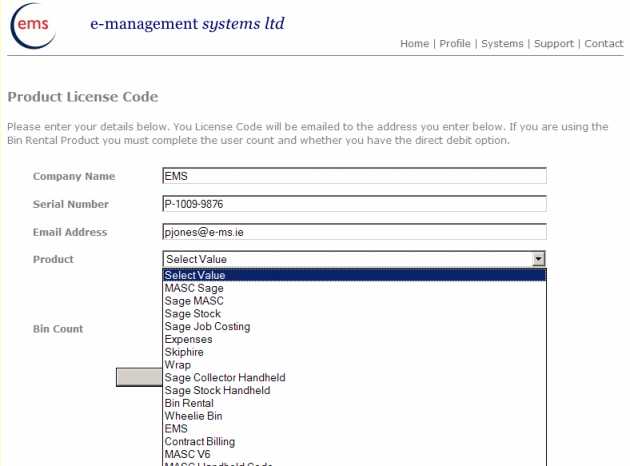
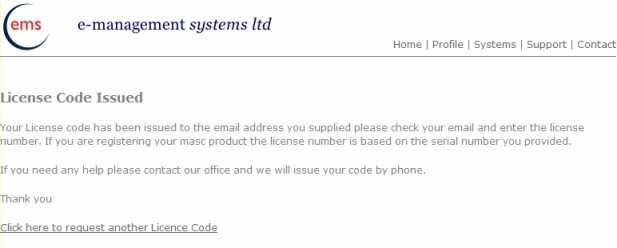
Enter your email address, then selct MASC V6 from the list and click on the button “Request License Code” an email will be sent with your license code and the following code will be displayed.
Our products MASC , WRAP and Sage Stock Count are now integrated into Sage Line 50 2010. We now support all versions from Sage V9 to Sage V16 (2010). For more information visit our web page. http://www.e-ms.ie/masc.htm
After we changed the vat for the second time in a year I amended this program to allow the users to change the vat code across customers and products. This version was written for Sage 2009. for the example I have hard coded the tax code but you would use a variable 🙂
Function ChangeVat()
On Error GoTo Error_Handler

DoCmd.Hourglass True
'check defaults
Application.Echo True, "Updating Program Data"

Dim oSDO As SageDataObject150.SDOEngine
Dim oWS As SageDataObject150.Workspace
Dim strDataPath As String
Dim oSalesRecord As SageDataObject150.SalesRecord
Dim oSalesDeliveryRecord As SageDataObject150.SalesDeliveryRecord
Dim bFlag As Boolean
Dim i As Integer, tmpInt As Long, tmpProg As Long, tmpCount, tmpLetter As String, tmpType As Double

Application.Echo True, "Checking for Sage Preferences to Add"

If ChkPrefs = False Then
    GoTo Sage_ExitImport
End If

' Create the SDOEngine Object
Set oSDO = New SageDataObject150.SDOEngine
' Create the Workspace
Set oWS = oSDO.Workspaces.Add("Example")
' Select company the select company method

' Connect to Data Files
oWS.Connect "Line50 Directory", "Login Name", "Login Password", "Example"

' Create Instance of Sales Record Object
Set oSalesRecord = oWS.CreateObject("SalesRecord")
' goto the first sales ledger record

oSalesRecord.MoveFirst

Do
        ' Edit the Record
        If oSalesRecord.Edit Then
            ' Change the Account Name
            oSalesRecord.Fields.Item("DEf_TAX_CODE").Value = 2
        ' Update the Record
            If oSalesRecord.Update Then
                ' The Update was Successful
                Application.Echo True, "Account " & oSalesRecord.Fields.Item("ACCOUNT_REF").Value &" was edited successfully."
            Else
                ' The Update was Unsuccessful
                MsgBox "The account could not be edited."
            End If
        End If

 Loop Until (Not oSalesRecord.MoveNext)
'--------------------
'Export the Products
'------------------
Dim oStockRecord As SageDataObject150.StockRecord
Dim oPriceRecord As SageDataObject150.PriceRecord
Dim oControlData As SageDataObject150.ControlData

' Create Instance of StockRecord Object
Set oStockRecord = oWS.CreateObject("StockRecord")
Set oPriceRecord = oWS.CreateObject("PriceRecord")
tmpCount = oStockRecord.Count
tmpProg = 1
oStockRecord.MoveFirst
Do

        ' Edit the Record
        If oStockRecord.Edit Then
            oStockRecord.Fields.Item("TAX_CODE").Value = 2
        ' Update the Record
            If oStockRecord.Update Then
                ' The Update was Successful
                Application.Echo True, "Account " & oStockRecord.Fields.Item("STOCK_CODE").Value & " was edited successfully."
            Else
                ' The Update was Unsuccessful
                MsgBox "The account could not be edited."
            End If
        End If

Loop Until (Not oStockRecord.MoveNext)

'Close connections
Set oStockRecord = Nothing
Set oControlData = Nothing

Sage_ExitImport:

' Disconnect and Destroy the Objects
oWS.Disconnect
Set oSalesRecord = Nothing
Set oSDO = Nothing
Set oWS = Nothing
DoCmd.Hourglass False

Exit Function

' Error Handling Code
Error_Handler:
Call SageError(oSDO.LastError.Code, oSDO.LastError.text, Err.Number, Err.Description, "Sage Import")

DoCmd.Hourglass False
Resume Sage_ExitImport

End Function
Sage Line 50 allows direct read/write access to many of the tables in Sage through the Sage Data Objects. To use this you will need to have the file sd0engxx0.tlb where xx is the sage version number.
2 keys issues I have had in loading data into sage
1. Ensure the values passed to Sage are not null, convert your values to strings where appropriate
2. The values passed to Sage are not longer than the field width
Sounds obvious but I missed both of these in earlier program versions.
The following Sample shows an invoice been posted from an access table to Sage.
Function fncCreateInvoices(ByVal tmpDate As Date)

On Error GoTo Error_Handler

'i use the date passed to filter the invoice table from MASC
If Not IsDate(tmpDate) Then
    MsgBox "Please enter a valid date"
    Exit Function
End If

DoCmd.Hourglass True

' Declare Objects
Dim oSDO As SageDataObject120.SDOEngine
Dim oWS As SageDataObject120.Workspace
Dim oInvoicePost As SageDataObject120.InvoicePost
Dim oInvoiceItem As SageDataObject120.InvoiceItem
Dim oSalesRecord As SageDataObject120.SalesRecord
Dim oStockRecord As SageDataObject120.StockRecord
Dim oSalesDeliveryRecord As SageDataObject120.SalesDeliveryRecord

Dim db As Database
Dim rstSource As Recordset, rstTrans As Recordset, strAccount
Dim tmpTranCust, tmpUseON As Boolean, tmpTranDD As String, tmpUseCPO As Boolean


Set db = CurrentDb

' Declare Variables
Dim strDataPath As String
Dim bFlag As Boolean
Dim iCtr As Integer

'sage initialise
' Create the SDO Engine Object
Set oSDO = New SageDataObject120.SDOEngine

' Create the Workspace
Set oWS = oSDO.Workspaces.Add("Example")

'Check that the selected invoices have a customer record See older posts for Actdate
Set rstSource = db.OpenRecordset("select * from QryCheckInvDates where tDate<=#" & ActDate(tmpDate) & "#")
Application.Echo True, "Checking Customers"
If rstSource.RecordCount > 0 Then
  If MsgBox("Some customer records are missing in sage, print a listing ?", vbYesNo) = vbYes Then
      DoCmd.OpenReport "rptMissingCustomers", acViewPreview
      GoTo Exit_Function
  Else
      MsgBox "Add the new customers to proceed"
      GoTo Exit_Function
  End If
End If
Application.Echo True, "Checking for Invoices to Add"
' create export code
Set rstSource = db.OpenRecordset("select * from qryInvoicestoExport where Value>0 and tDate<=#" & ActDate(tmpDate) & "# ORDER by Ref ASC")
If rstSource.RecordCount = 0 Then
      MsgBox "Nothing to process"
      GoTo Exit_Function
Else
  rstSource.MoveFirst
End If

Application.Echo True, "Checking for Sage Preferences to Add"

If ChkPrefs = False Then
    GoTo Exit_Function
End If

' Connect to Data Files
oWS.Connect "Line50 Directory","Login Name","Login Password", "Example"

Application.Echo True, "Connected to Sage"

'loop the record source
Do While Not rstSource.EOF

' Create an instance of InvoicePost & Record object's
 Set oSalesRecord = oWS.CreateObject("SalesRecord")
 Set oInvoicePost = oWS.CreateObject("InvoicePost")
 Set oStockRecord = oWS.CreateObject("StockRecord")


 ' Set the type of invoice for the next available number
 oInvoicePost.Type = sdoLedgerInvoice

 'get the transactions
 Set rstTrans = db.OpenRecordset("Select * from qryTrans Where hInvoiceno=" & rstSource!REF)
 If rstTrans.RecordCount = 0 Then
   MsgBox "No Transactions for invoice " & rstSource!REF
   GoTo loop_routine
 End If

 Application.Echo True, "Processing Invoice " & rstSource!REF


 ' Use the invoice number assigned from masc
 oInvoicePost.Header("Invoice_Number") = rstSource!REF

 ' Loop for Number of Items on the Invoice
       iCtr = 0
       tmpTranCust = ""
       Do While Not rstTrans.EOF

           Set oInvoiceItem = oInvoicePost.Items.Add()
         iCtr = iCtr + 1

         ' Initialise Index Field with value to search
         oStockRecord("Stock_CODE") = CStr(rstTrans!HprodC)
         If oSalesRecord.Find(False) Then
           oInvoiceItem("Stock_Code") = CStr(oStockRecord("Stock_Code"))
           oInvoiceItem("Description") = nullCstr(rstTrans!HInvText)
           oInvoiceItem("Comment_1") = nullCstr(rstTrans!HInvText)
           oInvoiceItem("Nominal_Code") = CStr(oStockRecord("Nominal_Code"))
           oInvoiceItem("Tax_Code") = CInt(Right(rstTrans!HVatRate, 1))
         Else
           oInvoiceItem("Stock_Code") = CStr(rstTrans!HprodC)
           oInvoiceItem("Description") = nullCstr(rstTrans!HInvText)
           oInvoiceItem("Comment_1") = nullCstr(rstTrans!HInvText)
           oInvoiceItem("Nominal_Code") = CStr(GetPref("Default Sales Nominal"))
           oInvoiceItem("Tax_Code") = CInt(Right(rstTrans!HVatRate, 1))
         End If

         ' Populate other fields required for Invoice Item
         oInvoiceItem("Qty_Order") = CDbl(rstTrans!HQty)
         oInvoiceItem("Unit_Price") = CDbl(rstTrans!HPrice)
         oInvoiceItem("Net_Amount") = CDbl(rstTrans!HLineValue)
         oInvoiceItem("Tax_Amount") = CDbl(rstTrans!HVatVal)
         oInvoiceItem("Comment_2") = CStr("Date:" & Format(rstTrans!HDATE, "dd/mm/yy"))
         oInvoiceItem("Unit_Of_Sale") = CStr("")
         oInvoiceItem("Full_Net_Amount") = CDbl(rstTrans!HVatVal + rstTrans!HLineValue)
         oInvoiceItem("Tax_Rate") = CDbl(rstTrans!VT_Rate)
         tmpTranCust = rstTrans!HCustCode
         tmpTranDD = nullCstr(rstTrans!HSuppref)
         rstTrans.MoveNext
      Loop ' on trans


 ' Populate Invoice Header Information
 oInvoicePost.Header("Invoice_Date") = CDate(rstSource!TDate)
 oInvoicePost.Header("Notes_1") = CStr("")
 oInvoicePost.Header("Notes_2") = CStr("")
 oInvoicePost.Header("Notes_3") = CStr("")
 oInvoicePost.Header("Taken_By") = CStr("")
 oInvoicePost.Header("Order_Number") = IIf(tmpUseON, Left(CStr(tmpTranDD), 7), "")
 oInvoicePost.Header("Cust_Order_Number") = IIf(tmpUseCPO, Left(CStr(tmpTranDD), 7), "")
 oInvoicePost.Header("Payment_Ref") = CStr("")
 oInvoicePost.Header("Global_Nom_Code") = CStr("")
 oInvoicePost.Header("Global_Details") = CStr("")
 oInvoicePost.Header("Invoice_Type_Code") = CByte(sdoProductInvoice)
 oInvoicePost.Header("Items_Net") = CDbl(rstSource!InvNet)
 oInvoicePost.Header("Items_Tax") = CDbl(rstSource!InvVat)

 ' Read the first customer
 strAccount = CStr(rstSource!ID)
 strAccount = strAccount & String(8 - Len(strAccount), 32)
 oSalesRecord("Account_Ref") = strAccount

 bFlag = oSalesRecord.Find(False) '("ACCOUNT_REF", strAccount)
 If bFlag Then
 oInvoicePost.Header("Account_Ref") = CStr(rstSource!ID) 'oSalesRecord("Account_Ref"))
 oInvoicePost.Header("Name") = CStr(oSalesRecord("Name"))
 oInvoicePost.Header("Address_1") = CStr(oSalesRecord("Address_1"))
 oInvoicePost.Header("Address_2") = CStr(oSalesRecord("Address_2"))
 oInvoicePost.Header("Address_3") = CStr(oSalesRecord("Address_3"))
 oInvoicePost.Header("Address_4") = CStr(oSalesRecord("Address_4"))
 oInvoicePost.Header("Address_5") = CStr(oSalesRecord("Address_5"))
 Set oSalesDeliveryRecord = oWS.CreateObject("SalesDeliveryRecord")
 Dim bEnd
 bEnd = False
 If Not IsNull(tmpTranCust) Or Len(tmpTranCust) <> 0 Then
   oSalesDeliveryRecord.MoveFirst
   Do
       If oSalesDeliveryRecord("DESCRIPTION") = tmpTranCust Then
         bEnd = True
         oInvoicePost.Header("DELIVERY_NAME") = CStr(oSalesDeliveryRecord("NAME"))
         oInvoicePost.Header("Del_Address_1") = CStr(oSalesDeliveryRecord("Address_1"))
         oInvoicePost.Header("Del_Address_2") = CStr(oSalesDeliveryRecord("Address_2"))
         oInvoicePost.Header("Del_Address_3") = CStr(oSalesDeliveryRecord("Address_3"))
         oInvoicePost.Header("Del_Address_4") = CStr(oSalesDeliveryRecord("Address_4"))
         oInvoicePost.Header("Del_Address_5") = CStr(oSalesDeliveryRecord("Address_5"))
         oInvoicePost.Header("Cust_Tel_Number") = CStr(oSalesDeliveryRecord("Telephone"))
         oInvoicePost.Header("Contact_Name") = CStr(oSalesDeliveryRecord("Contact_Name"))
       End If
   Loop Until (bEnd Or Not oSalesDeliveryRecord.MoveNext)

End If
End If
 ' Update the Invoice
 bFlag = oInvoicePost.Update
 If bFlag Then
   Application.Echo True, "Invoice Created Successfully :" & rstSource!REF
   db.Execute ("Update tblbillings set ar_PRocessed=-1 where ref=" & rstSource!REF)
 Else
   Application.Echo True, "Invoice Not Created"
 End If
loop_routine:

rstSource.MoveNext

Set oSalesRecord = Nothing
Set oInvoicePost = Nothing
Set oInvoiceItem = Nothing
Set oSalesDeliveryRecord = Nothing


Loop ' on rstsource


Exit_Function:

' Disconnect and Destroy Objects
oWS.Disconnect
Set oSDO = Nothing
Set oWS = Nothing
Set db = Nothing
Set rstSource = Nothing
Set rstTrans = Nothing

DoCmd.Hourglass False

Exit Function
' Error Handling Code
Error_Handler:
Call SageError(oSDO.LastError.Code, oSDO.LastError.Text, Err.Number, Err.Description, "Sage Invoice Export")

DoCmd.Hourglass False
Resume Exit_Function


End Function
To activate the third party products in Sage Line 50 you may be required to enter the Sage 3rd Party Activation Serial number and activation key. The following screen shows how to enter this number
